

Buying Guide
Best Cold Laminator Machines in 2026: 5 Cold Roll Picks for Prints and Vinyl
Oct
Best Cold Laminator Machines in 2026: 5 Cold Roll Picks for Prints and Vinyl
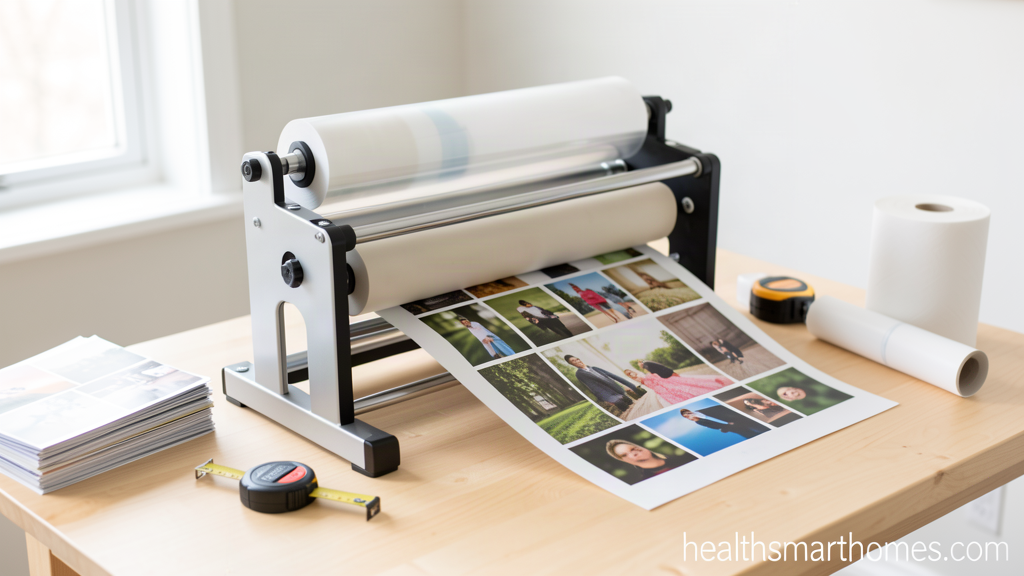
A cold laminator machine is a roll laminator that bonds pressure-sensitive adhesive film to prints, photos, and vinyl with unheated rubber rollers. Because it never warms the film, it protects heat-sensitive originals such as inkjet prints, thermal receipts, and older photographs while leaving a bubble-free, scratch-resistant surface.
The best cold laminator machine for most home and small-shop buyers is the VEVOR 25-inch manual cold roll laminator at about $98. It takes 25-inch (650 mm) film, accepts material up to 10 mm thick, needs no power, and folds against a wall when the job is done. If your posters run wider than 24 inches, the 29.5-inch version costs a dollar less and is the smarter buy. Anyone laminating daily should skip the crank and step up to a motorized unit with a take-up reel.
We compared current Amazon listings from VEVOR, INTBUYING, SHengwin, DEJUN, and HQHAOTWU, checked roll widths, thickness ratings, roller counts, and film core sizes against the spec sheets, and kept the five machines that solve the problems cold lamination actually has. Prices were verified in October 2026. If your bench also handles garment decorating, our pneumatic heat press comparison covers the machines that do want heat.
What a Cold Laminator Machine Does, and When It Beats Heat
A thermal laminator melts an adhesive layer with heated rollers. A cold laminator does the opposite: it presses a pressure-sensitive acrylic film onto the print with soft rubber rollers at room temperature. The adhesive grabs on contact and reaches full strength over the next 24 to 72 hours as it cures.
That difference decides three kinds of jobs. Inkjet photo prints, thermal receipts, dye-sublimation transfers, and older photographs can blister or curl under heat, and cold film leaves them untouched. Vinyl graphics and pre-mask work need film that can be repositioned briefly before it locks down, which only a pressure-sensitive adhesive allows. And with no heating element there is no warm-up, so the machine works the second you turn the crank.
The trade-offs are real: cold film costs more per square foot than thermal pouches, the finished surface is softer, and a cold bond will lift at the edges if you run the rollers too loose. You get back a machine with no thermostat and almost nothing to break.
What to Check Before You Buy a Cold Laminator Machine
Laminating width is the one spec you cannot work around
Measure the widest thing you laminate and add an inch. A 25-inch machine takes 24-inch prints, 13-inch units are for letter and A3 paper only, and 39- and 51-inch models are for signage and mounting. Manufacturers name the model after the width, so that number is a hard limit.
Film thickness and core size
Cold film is sold by the mil: 3 mil for light protection, 5 mil for everyday photos and signs, 10 mil for anything that has to hold its own shape. The core matters just as much. The 1-inch, 1.5-inch, and 3-inch cores are all in circulation, and most budget Amazon cold laminators take a 1-inch core only, so check the film rod before buying a case of film. Maximum material thickness is a separate rating: the VEVOR line takes 10 mm on the 25- and 29.5-inch models, 30 mm on the 39-inch, and the INTBUYING semi-automatic takes a full inch (25 mm).
Roller count, material, and pressure control
Two soft rubber rollers are the norm below $250 and they are plenty for flat stock. What separates a good machine from a frustrating one is pressure control. Look for independent knobs at each end so you can level the rollers, and back them off between sessions. Over-tightening is the most common owner complaint here, and it bends thin rubber rollers out of parallel, which shows up as wrinkles down one side.
Hand crank or motorized with a take-up reel
Manual machines run $97 to $228, need no electricity, and are nearly maintenance-free. Past roughly 20 sheets a day the crank becomes the bottleneck. Motorized and semi-automatic units add an electric feed, a foot pedal, and a self-removing film rod that peels the backing paper for you.
Build, weight, and where it lives
All-metal frames are standard, and so is heft. The 25-inch VEVORs ship around 27 to 33 pounds, while the INTBUYING semi-automatic weighs 103.6 pounds and rides on a stand with casters. Folding tables let the manual units store on a shelf. Give yourself the machine’s width plus a foot of clearance on both sides.
The 5 Best Cold Laminator Machines for 2026
Prices below were checked in October 2026.
1. VEVOR 25-Inch Manual Cold Roll Laminator — Best Overall
This is the machine we would buy first. $97.90 buys a 25-inch (650 mm) soft rubber roller set in an all-metal frame, a maximum laminating thickness of 10 mm, and a folding table that lets the whole thing disappear onto a shelf. It holds a 4.5-star average across 308 Amazon ratings, the deepest review pool of any cold laminator we looked at.
It is manual, so there is no power cord, no warm-up, and nothing electronic to fail. Feed the print and the film together, turn the crank, and the rollers do the rest. One habit worth building early: release the pressure knobs after every session, because owners who leave the rollers pinched report flat spots a year in.
Check the VEVOR 25-Inch Manual Cold Roll Laminator price on Amazon.
2. VEVOR 29.5-Inch Cold Laminator Machine — Best Value for Poster Work
The 29.5-inch model is the quiet bargain of the line: $97.30, four and a half stars across 257 ratings, and nearly five inches more working width than the machine above for less money. If your jobs are 24-inch posters or 27-inch mounted prints, that width is the difference between one pass and fighting a seam down the middle of a two-pass job.
Everything else carries over — manual operation, soft rubber rollers, 10 mm maximum material thickness, the same fold-up table. The price you pay is footprint and weight: plan on roughly 30 by 17 inches of bench space.
Check the VEVOR 29.5-Inch Cold Laminator price on Amazon.
3. INTBUYING 25-Inch Semi-Automatic Cold Laminator — Best Motorized Pick
When volume stops being a hobby, this is the step up. INTBUYING’s 25-inch semi-automatic runs in electric or manual mode, uses a foot pedal so both hands stay on the print, and includes a self-removing film rod that takes up the backing paper automatically. Maximum laminating width is 650 mm and maximum thickness a full inch (25 mm), enough for mounting prints onto foam board.
The build is the other reason it makes this list: an all-metal frame, an emergency stop switch, brake wheels, and a shipping weight of 103.6 pounds. That is commercial equipment and it wants a stand rather than a desk. Street prices for the 25-inch semi-automatic class cluster around $390, several times the manual VEVORs — fair, because you are buying back the hour a day you would spend cranking and peeling.
Check the INTBUYING 25-Inch Semi-Automatic Cold Laminator price on Amazon.
4. VEVOR 39-Inch Cold Laminator — Best for Signage
The 39-inch version is where a cold laminator stops being a desktop tool. At $159.90 it accepts material up to 30 mm thick, which covers the foam board, PVC sheet, and mounted prints that sign work actually runs, and it holds a 4.5-star average across 93 ratings. If you cut vinyl and pre-mask decals, this is the size where the roll stays flat and the edges stop curling.
It is still manual and still folds, but it is a two-person move. Above it the line continues to 51 inches at $227.90 (4.0 stars, 90 ratings) for banners, and at that width you are buying reach rather than a different class of machine.
Check the VEVOR 39-Inch Cold Laminator price on Amazon.
5. SHengwin 13.6-Inch Hot and Cold Roll Laminator — Best Compact Desktop
Not every buyer needs a 25-inch footprint. The SHengwin 13.6-inch roll laminator takes A3 and A4 stock, runs hot and cold modes, and steps from room temperature to 200°C with a digital readout, so one machine covers pressure-sensitive film and thermal work. It lists around $239.
Rollers and a continuous film feed beat pouches for odd-shaped items, and the 0 to 1800 mm per minute speed range lets you slow down for delicate inkjet prints. It fits a home office desk and covers documents, certificates, and small photos. If you want more width in that class, DEJUN’s 13-inch and 18-inch roll models list at $249 and $379.
Check the SHengwin 13.6-Inch Hot and Cold Roll Laminator price on Amazon.
Cold Laminator Machine Prices: What Each Tier Buys
| Tier | Typical Price | What You Actually Get |
|---|---|---|
| Manual desktop, 12 to 13 in | $77 – $130 | Two soft rubber rollers, letter and A3 stock, 1 mm material paths, folds away |
| Manual 25 in | $86 – $130 | 650 mm width, 10 mm material thickness, roughly 27 to 33 lb, no power needed |
| Manual 29.5 to 39 in | $97 – $160 | Poster and sign stock, 30 mm material thickness at 39 in, still crank-driven |
| Manual wide format, 51 in | $227 – $230 | Banner width, 15 mm thickness, needs a long bench and two people to move |
| Motorized or semi-auto 25 in | $380 – $430 | Electric feed, foot pedal, self-removing backing paper, 100 lb plus build |
| Hot and cold desktop roll | $220 – $380 | Dual mode, digital temperature, 13 to 18 in, A3 and A4 plus thermal work |
Two reference points for calibration: the VEVOR 51-inch manual tops the line at $227.90, and INTBUYING’s 63-inch electric cold laminator steps past $1,000 at production widths. Past about $250 the money stops buying a better cold bond and starts buying width, motorization, and film handling. You can browse our shop to compare current listings side by side.
How to Set Up and Use a Cold Laminator Machine
- Load the film with the rollers apart. Open the pressure knobs until the rollers are clearly separated, then slide the film roll onto the top rod with the adhesive facing the direction of travel. Threading under pressure is how film gets creased before it touches a print.
- Set the roller gap to the material, not to the film. Start slightly wider than your thickest stock and close it down in small increments. The right setting holds the print flat without squeezing the rollers.
- Thread the backing paper onto the take-up rod. The release liner has to peel away as the film feeds or it will ball up under the print. Manual machines need a hand peel; the INTBUYING’s rod does it for you.
- Test on scrap before you ruin a print. Run the same paper or vinyl at the same thickness first. Bubbles, silvering, and edge lift all mean pressure is too light or the gap is too wide, and both are fixed with the knobs.
- Feed at a steady speed, not a fast one. Keep the print square to the roller with one hand and guide the exiting sheet with the other so it does not curl back into the nip.
- Release the pressure and let the adhesive cure. Back both knobs off, wipe the rollers with a dry lint-free cloth, and leave the piece flat for 24 hours. Pressure-sensitive adhesive keeps bonding for up to 72 hours, and handling a fresh laminate aggressively is what causes the corner lift people blame on the film.
Cold vs Thermal Lamination: Which One Do You Need?
Choose cold when the original cannot take heat, when you need to reposition film before it locks, or when you are mounting a print to a rigid substrate. Choose thermal for the hardest, most rigid surface on documents, ID cards, and menu covers, and accept the warm-up and a film that bonds permanently on contact.
Plenty of buyers end up with both, which is where a 13-inch hot and cold roll machine like the SHengwin earns its place on the bench: one footprint, two jobs, and the cold side costs nothing extra. The same logic drives garment work, where our 15×15 heat press guide makes the case for matching the platen to the print size instead of asking one machine to do everything.
Start with width and film core, because those two constraints decide which machines are even eligible. Then set your price by how often you will crank: a $98 VEVOR 25-inch manual is right for a few hundred sheets a year, and the INTBUYING semi-automatic is right the moment lamination becomes a daily task.
